Active Directory (AD) is a critical component in an organization’s IT infrastructure. It serves as a centralized database for managing user accounts, computers, groups, and other network resources, enabling efficient access control and security measures. When AD becomes cluttered, it hinders efficient network management and increases the chances of security breaches. A well maintained AD simplifies administration, enhances security, and streamlines AD management. Regular maintenance, such as removing unused accounts, reviewing group memberships helps prevent AD clutter.
What is AD clean up and why is it important?
AD clean up is a critical process in managing the network. It typically involves identifying and removing expired, stale accounts, revising group memberships, and reviewing file permissions. It also necessitates updating information and ensuring consistency in naming conventions. It is essential to have it cleaned for the following reasons:
Security: Overtime AD accumulates unnecessary objects such as expired or stale user accounts. It can be exploited by malicious actors, potentially leading to unauthorized access and data breaches.
Network efficiency and performance: A cluttered AD results in slower logins, resource allocation issues and difficulties in managing user access.
Compliance: The GDPR and HIPAA necessitate accurate and up-to-date records. Failure to maintain a clean AD may result in compliance violations and legal repercussions.
AD cleanup is a proactive measure that enhances security, network efficiency, and compliance. It also ensures that the AD environment is well organized, secure and high-performing.
The right way to clean AD
Identify stale accounts: Identifying stale accounts is a key step in decluttering AD. Identifying stale accounts reduces the attack surface as threat actors often target stale accounts because they are forgotten or abandoned. Second, it ensures efficient resource allocation since inactive accounts waste resources like licenses and storage, which could be better used elsewhere. As a final benefit, it promotes compliance with data protection regulations. In order to demonstrate compliance with data privacy laws, organizations need to maintain accurate data.
Disabling/Deleting stale accounts: Inactive users and computer accounts need to be disabled or deleted from Active Directory to maintain a secure and efficient IT environment. Security risks can arise from inactive accounts exploited by malicious actors. It’s possible to mitigate potential vulnerabilities by removing or deactivating them. Moreover, it streamlines administrative tasks, reduces clutter, optimizes resource allocation, and simplifies AD management.
Remove/update group memberships: Managing stale group memberships in Active Directory is crucial to efficient and secure operations. Group memberships may become outdated as organizations evolve, roles change, and employees change. Keeping them up-to-date ensures users have only access to required resources. By simplifying auditing and streamlining access control, it is easier to track who has permission to what. Keeping groups up to date enhances security, optimizes resource allocation, and ensures compliance with data protection regulations.
Clean OUs: It’s crucial to clean OUs in Active Directory for effective AD cleanup. Over time, OUs can become cluttered with obsolete objects. A clean OU structure makes it easier to locate and manage active resources. It enhances IT efficiency and reduces the risk of security vulnerabilities caused by forgotten or unneeded objects.
Automate AD clean up: Automating Active Directory cleanup is crucial for several reasons. It minimizes human errors by ensuring consistency and accuracy. The use of automated scripts and tools can identify and remove outdated group memberships, expired passwords, and inactive accounts systematically. Routine cleanup tasks can be automated to save time and resources. As a result, IT professionals can focus on strategic aspects of network management. It reduces manual, repetitive tasks. Automation also reduces the window of opportunity for potential threats by addressing vulnerabilities promptly. Maintaining a secure, efficient, and compliant Active Directory requires an automated cleanup process.
How ManageEngine AD360 helps automate AD clean up
ManageEngine AD360 is an enterprise IAM solution that comes with AD management, risk assessment, identity life cycle management, workflow orchestration, and integration capabilities. This helps streamline identity management effortlessly.
AD360′ AD cleanup capabilities include:
Generate reports to detect stale user and computer accounts in your AD, keeping it clean and secure.
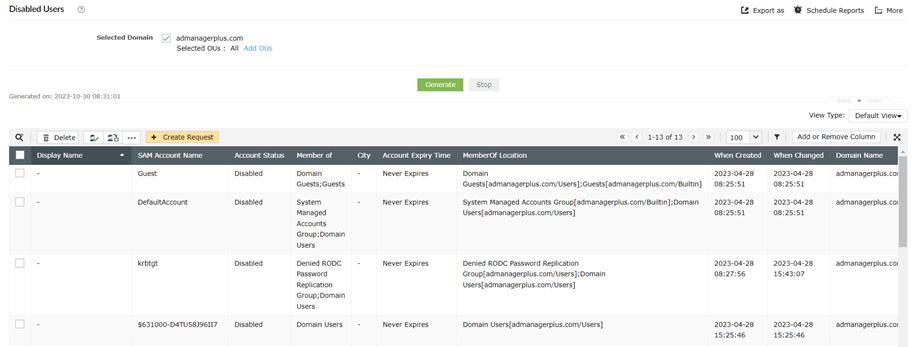
Figure 1: Disabled users report
Review and authorize AD cleanup tasks through a review-approve process, ensuring compliance regulations are met and maintaining a secure IT environment.

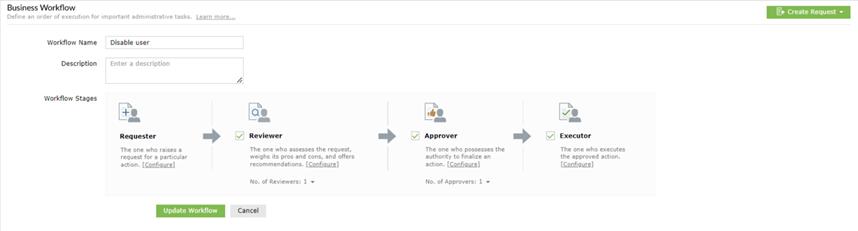
Figure 2: Review-approval process
Conclusion
Data integrity and network security require a clean and organized AD environment. It is critical to clean up AD regularly using the right tools and following an AD cleanup checklist. In this process, ghost or expired accounts, as well as disabled accounts, can be mitigated. Even though native tools like PowerShell are useful, they are time-consuming to use and maintain. By automating tasks, you save time and reduce errors. Ensure regulatory compliance, enhance AD efficiency and security, and prevent breaches. This comprehensive approach ensures your AD environment is organized, secure, and optimized.